Join our Zoom event in partnership with Microsoft & receive up to RM10,000 in Caction and Microsoft Power BI usage credits. T&Cs apply.
Reduce equipment downtime, missed maintenance, idle assets and costly breakdowns with real-time operational visibility.
Caction helps equipment rental companies manage more than just rental jobs — it connects assets, maintenance, technicians and service activities in one platform so you can get clearer visibility across your fleet.

 Trans Elite Group
Good response by the team members on queries.
Caction is used by equipment rental organisations including Trans Elite Group Sdn Bhd, a heavy lift specialist and equipment rental company.
Asset Utilisation
Keep equipment productive and ready for the next rental
Maintenance & Breakdown Response
Respond faster to breakdowns and maintenance needs
Inspection Visibility
Track equipment condition, defects and outstanding issues
Rental & Return Tracking
Know where every asset is and when it is due back
Equipment rental businesses are under constant pressure to keep their fleet earning. An excavator sitting in the yard, a generator waiting for repair or a scissor lift held back because its inspection is overdue is not simply an idle asset — it is equipment that could be generating rental revenue. Every rental creates a chain of operational activities that must happen at the right time, from quote and preparation through delivery, servicing and collection.
The challenge is not simply knowing where equipment is. It is keeping the fleet available, productive and ready to generate revenue.
Confirm availability and get the right equipment ready before it leaves the yard.
Track where each asset is deployed and when it’s due back.
Record breakdowns, repairs and parts against the asset as they happen.
Inspect returned equipment and clear it for its next rental.
A rental starts before equipment leaves the yard. Teams need to confirm the right asset is available, in suitable condition and ready for the customer’s requirements — while coordinating the jobs needed to prepare it.
Caction connects rental requests, equipment availability, job scheduling, inspections and preparation activities, giving teams a clearer view of what needs to happen before dispatch — helping schedule preparation work, reduce delays and get the right equipment ready for the next rental.
Once equipment leaves the yard, teams need visibility into which asset was delivered, where it is deployed, who is using it and when it is due back.
Caction connects rental jobs, assets, customers, locations and rental status in one place, giving teams a clearer view throughout the rental period. Know where equipment is, track active rentals and reduce the risk of assets being overlooked while deployed.
When rental equipment breaks down, the current failure may be linked to previous faults, repairs, parts replaced, wear or recurring issues. Without a complete asset history, technicians and coordinators may have to piece together what happened before starting the diagnosis.
Caction keeps breakdown records, repairs, inspections, photos and service history connected to each asset, giving teams the context they need before taking action — helping them understand what happened before, identify recurring issues faster and make better repair decisions.
Rental equipment is rarely used in controlled conditions. Dust, mud, heavy loads, long working hours and demanding job sites can quickly affect equipment condition, especially when the same asset moves between different customers. When equipment comes back, rental teams need to know what happened during the rental, what condition the asset is in and what needs to be done before it goes out again.
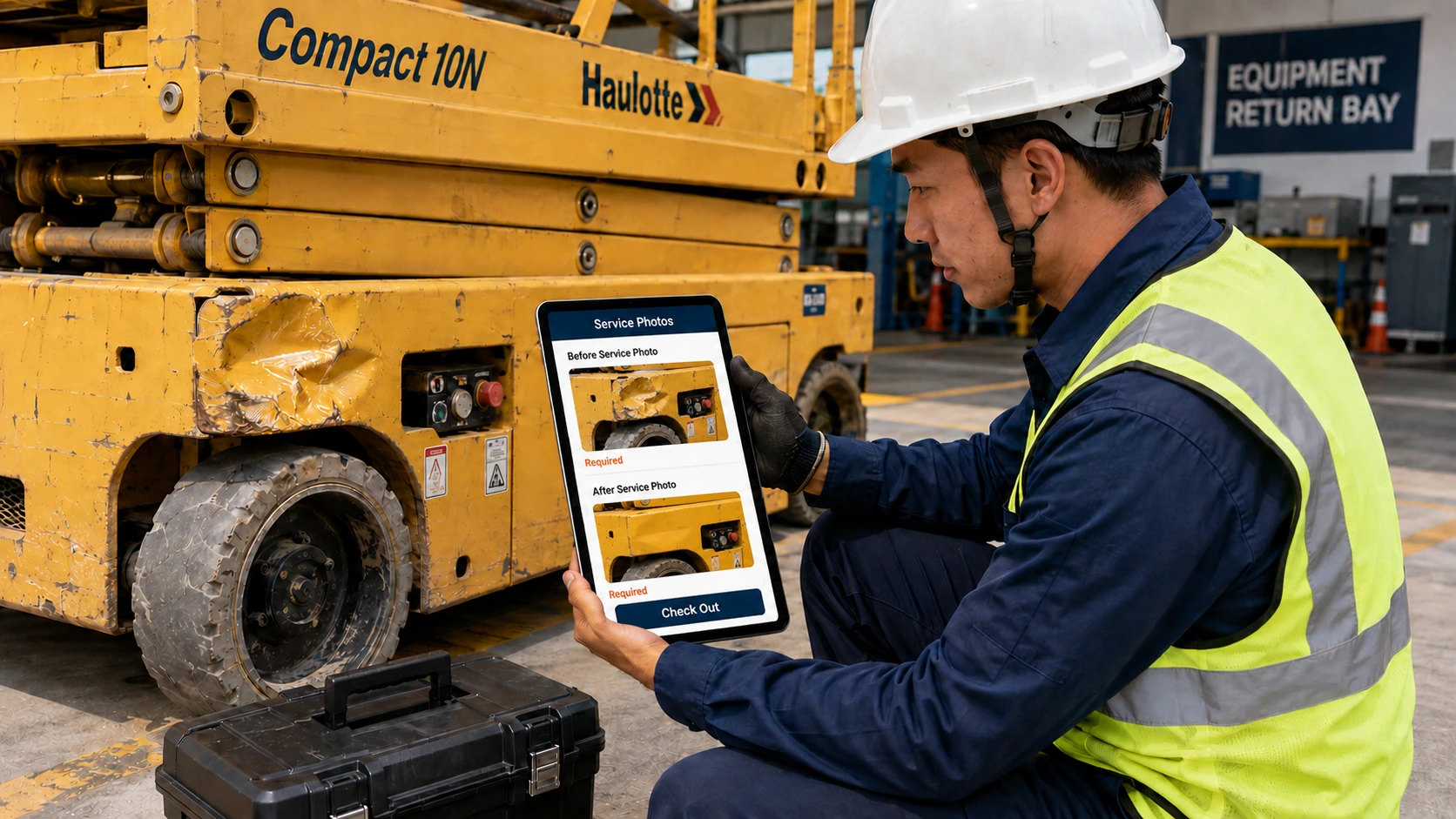
Caction lets teams capture inspections, photos, damage, repairs and service records digitally from the field — keeping equipment records up to date, reducing paperwork and getting assets rental-ready faster.
A rental starts before equipment leaves the yard. Teams need to confirm the right asset is available, in suitable condition and ready for the customer’s requirements — while coordinating the jobs needed to prepare it.
Caction connects rental requests, equipment availability, job scheduling, inspections and preparation activities, giving teams a clearer view of what needs to happen before dispatch — helping schedule preparation work, reduce delays and get the right equipment ready for the next rental.
Once equipment leaves the yard, teams need visibility into which asset was delivered, where it is deployed, who is using it and when it is due back.
Caction connects rental jobs, assets, customers, locations and rental status in one place, giving teams a clearer view throughout the rental period. Know where equipment is, track active rentals and reduce the risk of assets being overlooked while deployed.
When rental equipment breaks down, the current failure may be linked to previous faults, repairs, parts replaced, wear or recurring issues. Without a complete asset history, technicians and coordinators may have to piece together what happened before starting the diagnosis.
Caction keeps breakdown records, repairs, inspections, photos and service history connected to each asset, giving teams the context they need before taking action — helping them understand what happened before, identify recurring issues faster and make better repair decisions.
Rental equipment is rarely used in controlled conditions. Dust, mud, heavy loads, long working hours and demanding job sites can quickly affect equipment condition, especially when the same asset moves between different customers. When equipment comes back, rental teams need to know what happened during the rental, what condition the asset is in and what needs to be done before it goes out again.
Caction lets teams capture inspections, photos, damage, repairs and service records digitally from the field — keeping equipment records up to date, reducing paperwork and getting assets rental-ready faster.
Each stage can create new inspection records, defects, repairs, photos, service reports and follow-up actions. If those records are difficult to retrieve later, technicians and coordinators are forced to work from incomplete information.
Caction gives your team a connected operational record across the equipment lifecycle.
Running an equipment rental business means keeping assets available, moving and ready to earn — while dealing with unpredictable breakdowns, damage, servicing and returns.
A machine may be out on rental when a breakdown is reported.
The operations team has to work out:
At the same time, rental leaders need to keep the wider fleet productive.
They need to know:
Meanwhile, equipment continues moving through pre-rental inspections, delivery, site use, servicing, collection, return inspections and preparation for the next rental.
The challenge isn’t simply knowing whether equipment is rented out. It’s knowing whether every asset is available, reliable and ready to generate revenue.
Keep Rental Assets Moving, Available and Ready for the Next Job
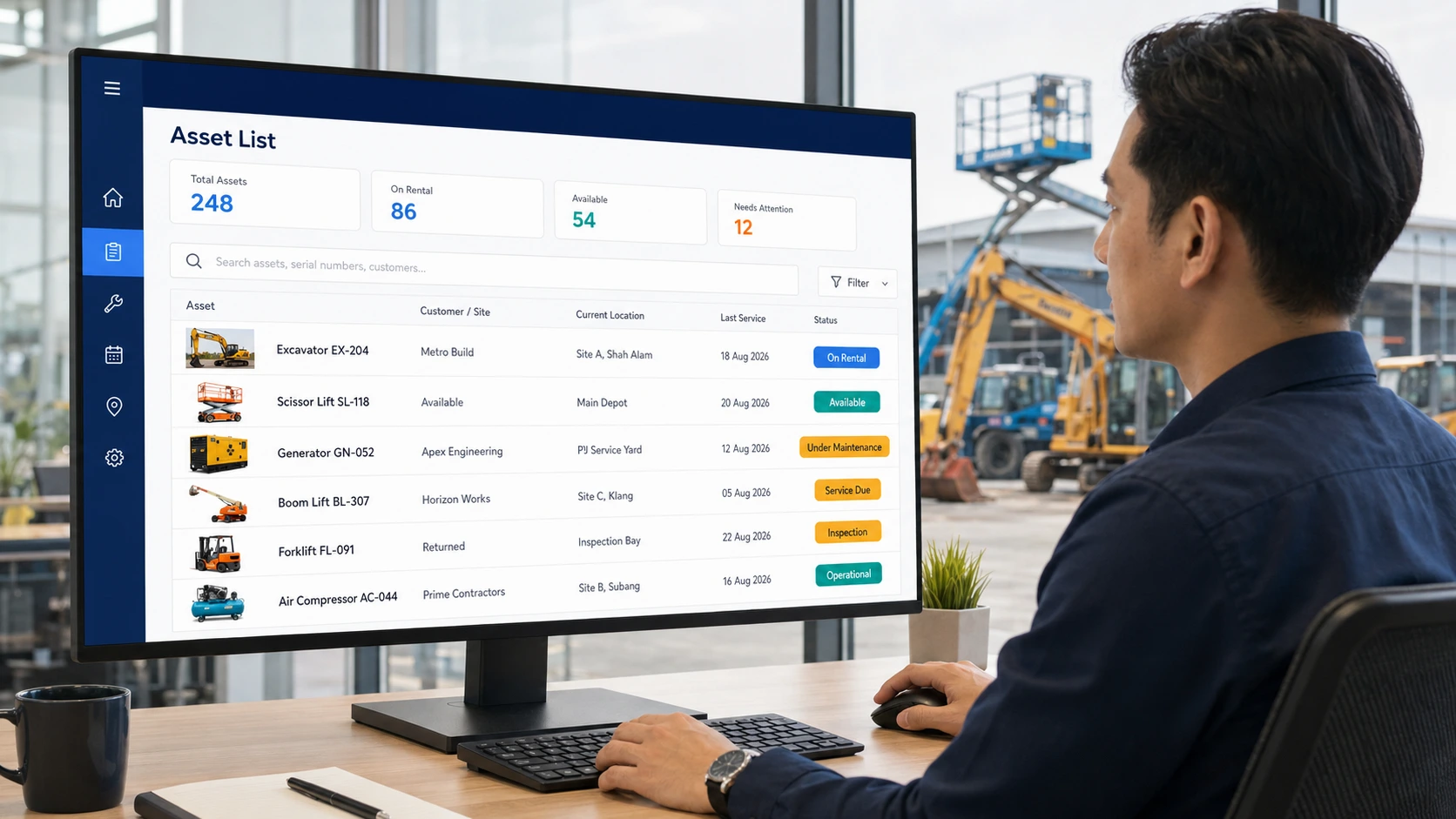
From delivery and deployment to maintenance, collection and redeployment, equipment rental creates a constant flow of asset movements and service activities. Caction brings these activities together so your team can see which equipment is available, where it is, what condition it is in, which jobs are due and what needs attention before the next rental.
Equipment information is often scattered across spreadsheets, WhatsApp conversations, paper records and different systems. When teams need to know an asset’s condition, rental history or previous service work, they may have to piece the information together from multiple places.
Create a central record for every piece of equipment, including:
Give your team a complete view of each asset without searching across different records. Know what happened to the equipment, where it has been and what it needs next.
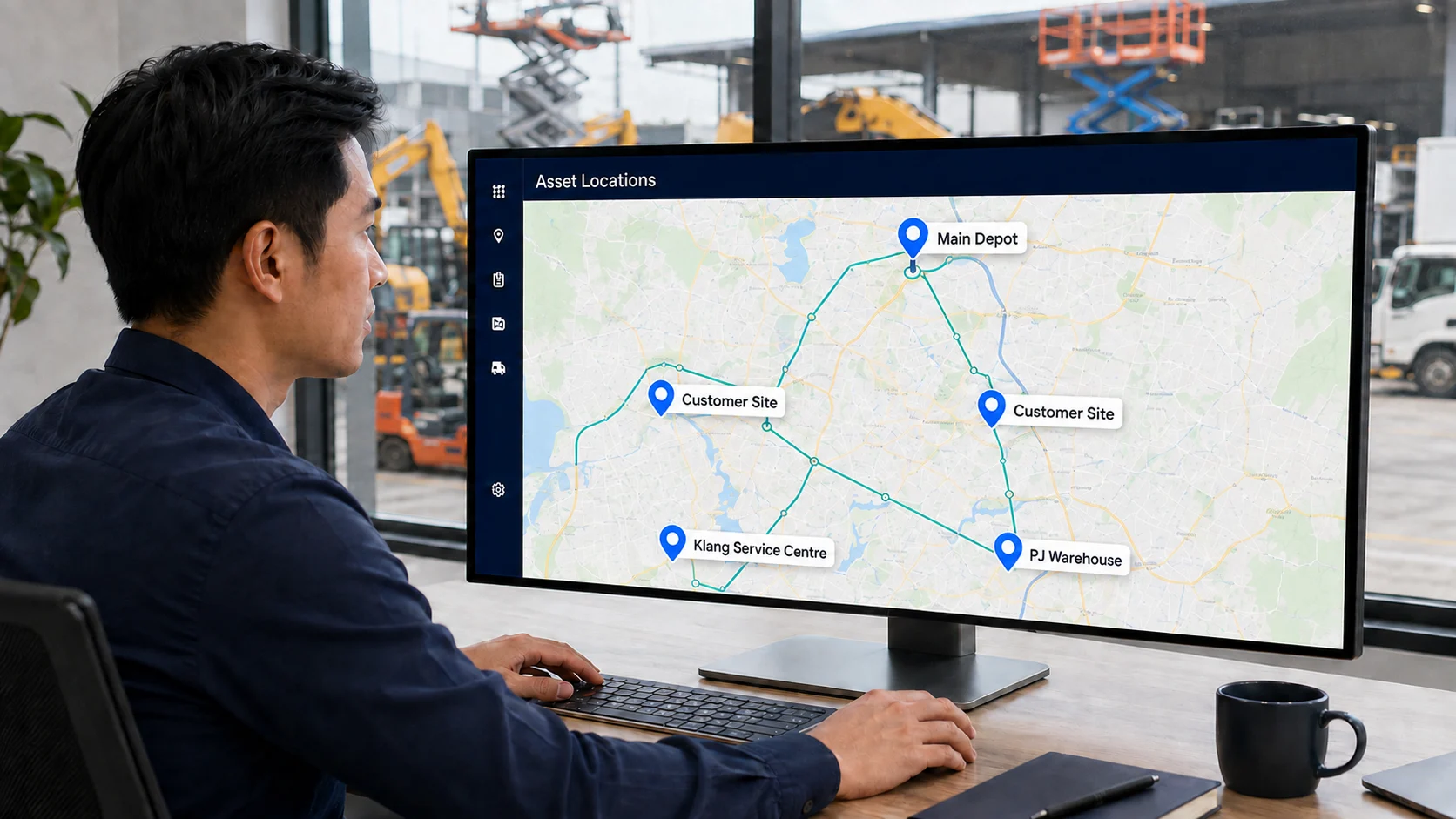
Equipment is constantly moving between warehouses, customers, job sites and service locations. Without clear location records, teams can waste time trying to find equipment or coordinating deliveries, collections and transfers.
Maintain a clear view of an asset’s movement. Use this information to coordinate equipment delivery, collection, maintenance visits, transfers and future rental planning.
Reduce the uncertainty around equipment location and make it easier to plan the next movement of every asset.
Rental equipment can experience heavy use and rough operating conditions. When maintenance depends on individual technicians or inconsistent processes, important service steps can be missed and equipment may return to rental without being properly checked.
Create structured SOPs and checklists that guide technicians through maintenance and repair work. Technicians can record findings, capture photos and videos, document work performed, update job status and collect customer confirmation digitally.
Make equipment maintenance more consistent across technicians and service jobs. Give managers greater confidence that required service steps have been completed before equipment goes back into circulation.
Coordinating technicians through calls, WhatsApp and spreadsheets makes it difficult to know which jobs have been assigned, attended to or completed. Managers often have to chase updates before they know what is happening in the field.
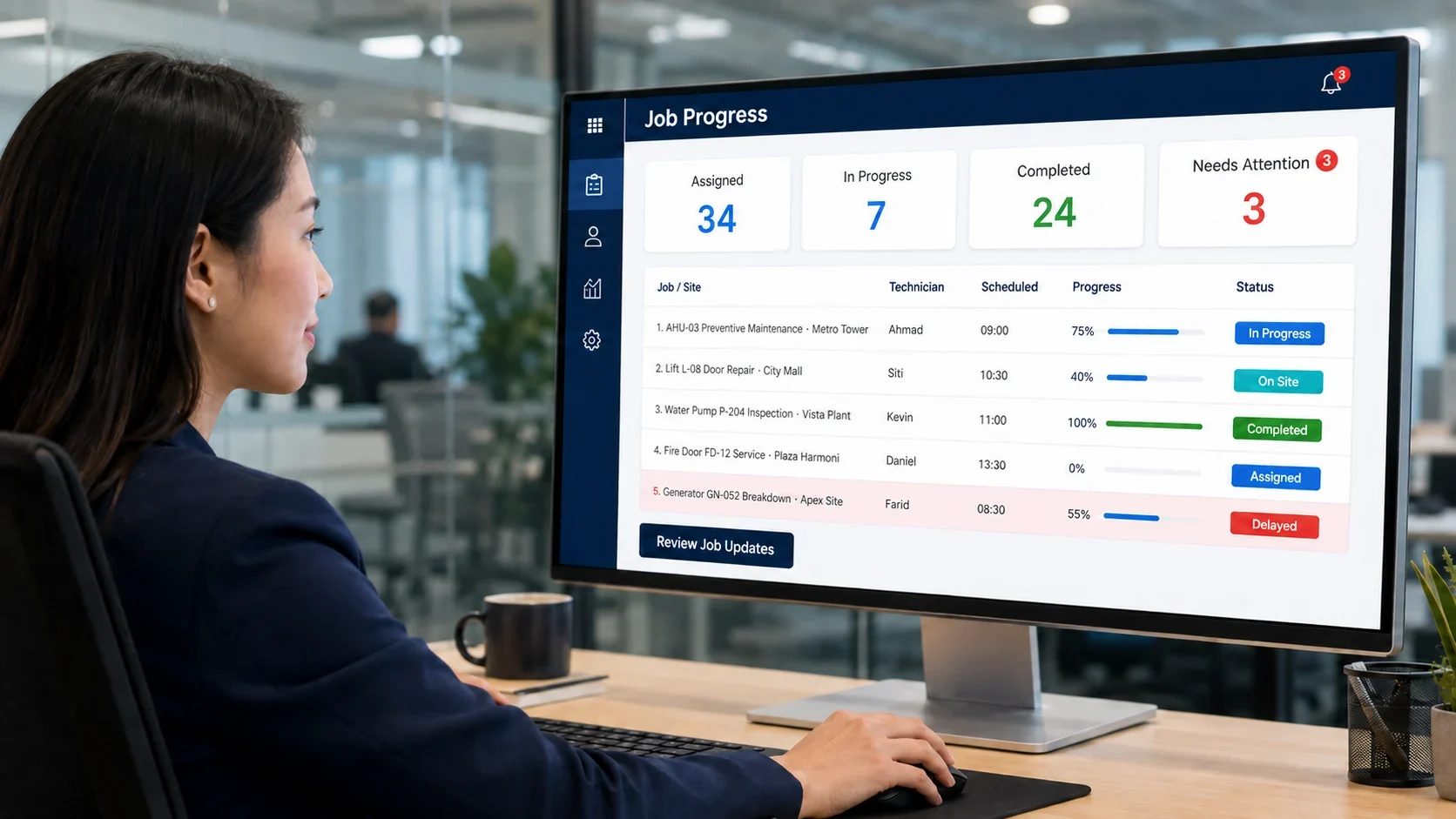
Bring job assignments, schedules, instructions, status updates and service reports into one system. Teams can see which jobs are in progress, completed or still require attention without relying on manual follow-ups.
Know what is happening across your service jobs without constantly chasing technicians for updates. Improve coordination and respond faster when jobs are delayed or require follow-up.
Without a consistent record of each service visit, it can be difficult to see what was checked, what was done and whether anything still needs attention.
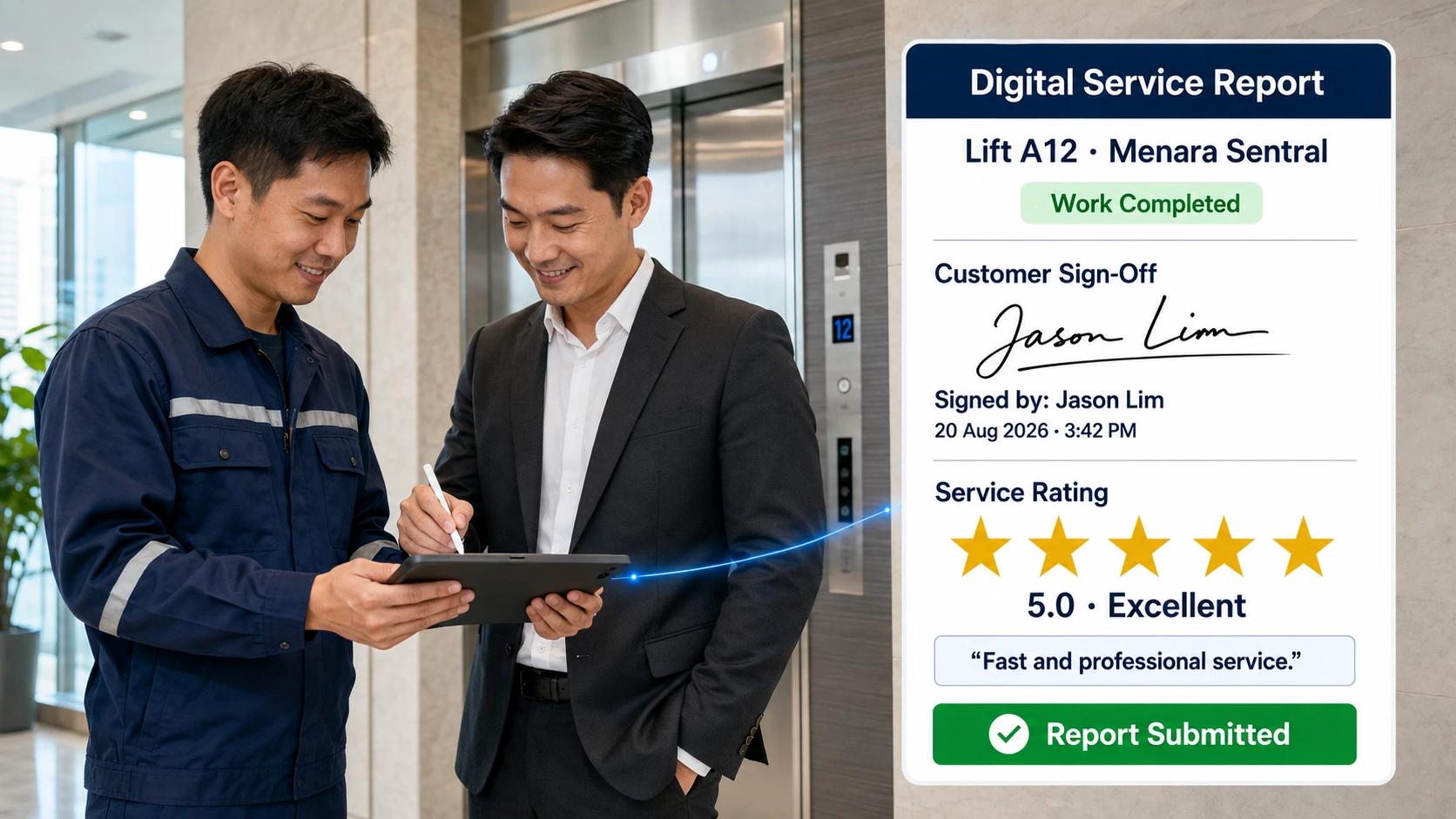
Capture the details of every service visit directly from the field, including:
Keep service teams accountable for every maintenance job. Managers can see what work was completed, when it was completed and what condition the equipment was left in — helping ensure equipment is properly maintained and ready for its next rental.
Individual service reports show what happened on a single job, but they do not always reveal which assets are repeatedly breaking down, consuming service resources or becoming less reliable.
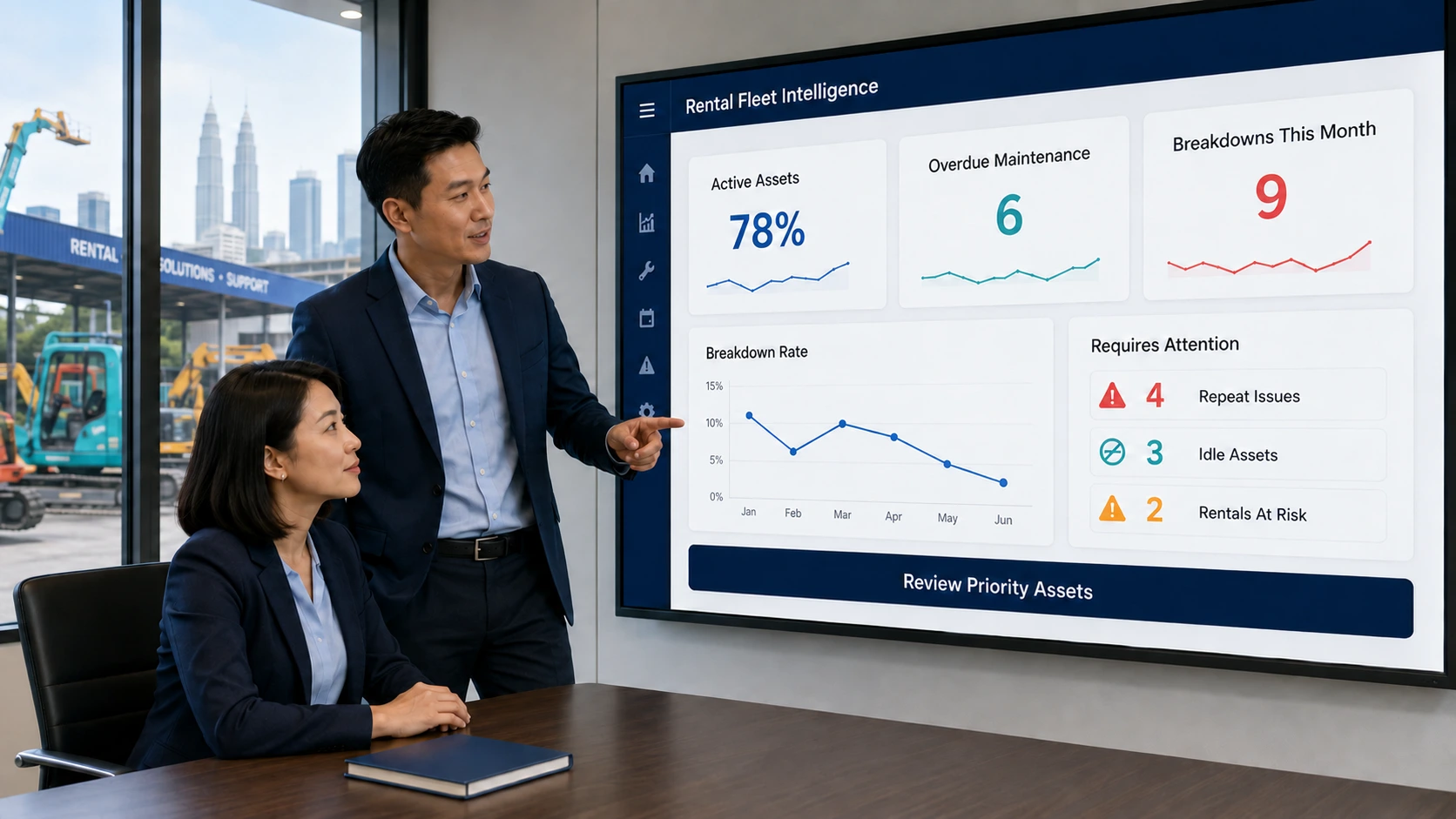
Connect service activity to each asset and use Caction Intelligence to identify trends across the fleet, including:
Move beyond reacting to individual breakdowns. Identify problem equipment, recurring service patterns and maintenance trends so you can make better decisions about how your fleet is managed and utilised.
Equipment rental operations need more than a system that shows whether an asset is available, rented, returned or under maintenance. Operational leaders also need to understand what is happening across equipment, rental jobs, maintenance, utilisation, customers and service activities.
Caction Intelligence (CI) turns rental and service data into practical insights, helping equipment rental teams monitor fleet utilisation, identify maintenance issues, track asset performance and spot where operational problems are affecting availability and profitability.
| See | Understand | Act |
|---|---|---|
| Equipment utilisation | Which assets are heavily used, underused or sitting idle | Improve fleet allocation and rental opportunities |
| Equipment downtime | Which assets are unavailable and why | Reduce downtime and get equipment back into service faster |
| Recurring breakdowns | Which equipment generates repeated repair issues | Investigate root causes and improve maintenance decisions |
| Maintenance status | Which equipment is due, overdue or currently under repair | Prioritise maintenance and prevent avoidable downtime |
| Service history | Which assets are consuming the most service attention | Identify high-cost or problem equipment |
| Maintenance costs | Which equipment is becoming expensive to maintain | Make better repair, replacement and fleet investment decisions |
| Rental activity | Which equipment is generating consistent rental demand | Optimise fleet availability around customer demand |
| Equipment performance trends | Where reliability or utilisation is changing over time | Identify opportunities to improve fleet profitability |
Keep Your Equipment Moving, Maintained and Ready for the Next Rental
Equipment rental is not just about knowing which machines are rented out. Every asset moves through a cycle — available, rented, delivered, used, returned, inspected, maintained and rented again. When that cycle is managed through spreadsheets, calls and separate records, equipment can sit idle, maintenance can be missed and valuable rental opportunities can be lost. Caction gives rental teams a connected view of the fleet so they can keep equipment available, maintained and generating revenue.
| Before Caction | With Caction |
|---|---|
| Equipment status is updated manually | See the current status of each asset in one place |
| Teams spend time asking where equipment is | Track where equipment is and where it has been |
| Returned equipment is checked through inconsistent processes | Use structured inspection and maintenance workflows |
| Maintenance depends on reminders and individual follow-up | Schedule and track servicing against each asset |
| Equipment can sit waiting for inspection or repair | See which assets are awaiting action before returning them to the rental fleet |
| Service work is recorded separately from the equipment | Keep maintenance and repair activity connected to the asset |
| Technicians use different ways of carrying out inspections | Standardise inspections with digital SOPs and checklists |
| Managers have limited visibility into fleet condition | See which assets are ready, rented, under maintenance or unavailable |
| Difficult to identify frequently repaired equipment | Identify assets generating repeated maintenance activity |
| Fleet decisions rely heavily on experience and manual reports | Use operational data to understand fleet performance |
| Managers spend time chasing updates across teams | Bring fleet, rental and maintenance activity into one operational view |
Measure What Actually Keeps Your Fleet Earning
The goal of digitalisation isn’t simply to replace paper. It’s to make important operational information easier to see, understand and act on.
Fleet Readiness
Know which assets are available, rented, under maintenance, awaiting repair or ready for their next rental. Give your team a clearer picture of what can be deployed instead of discovering too late that equipment is unavailable.
Equipment Location
Equipment moves between customers, construction sites, warehouses, workshops and other locations. Track the movement of each asset so your team can coordinate deliveries, collections, transfers and upcoming rentals more effectively.
Equipment Condition
Rental equipment can take significant wear and tear, particularly when operating in demanding environments. Use digital maintenance workflows to make sure required inspections, servicing and repairs are carried out before equipment goes back into circulation.
Turnaround Time
An asset that is sitting in the yard waiting for inspection, repair or maintenance is not generating rental revenue. Give teams visibility into outstanding actions so equipment can move through the return → inspection → maintenance → ready cycle faster.
Maintenance Cost
Some equipment will naturally require more maintenance than others. Connect repair and maintenance activity to individual assets to identify equipment with frequent breakdowns, repeated repairs or high service activity. This gives managers better information when deciding whether an asset should continue in the fleet.
Fleet Planning
Rental demand, equipment availability and maintenance requirements are constantly changing. With a connected view of your fleet, managers can make better decisions about which assets to deploy, maintain, replace, relocate or keep available for upcoming demand.